
BT Broadband Scam Calls for Seniors: The Scripts, What BT Will Never Ask, and What to Do in the First Hour
A call saying BT will disconnect your broadband is almost always a scam — but hanging up is only step one. This guide gives you the exact scripts, the BT never-list, the 159 bank number, and the first-hour order the old warnings never give you.
As an Amazon Associate, I earn from qualifying purchases.
In a hurry? See the current price on Amazon.
Affiliate disclosure: As an Amazon Associate I earn from qualifying purchases. This is a safety guide, not a buying guide, so the links below are searches only for genuinely fitting prevention products (a call-blocking device, a senior phone with spam-call blocking, a cordless phone with call block, a scam-protection book), so you can compare current listings yourself. We print no prices, because prices change too often — and differ too much between sellers and models — to print honestly. Check the current price and the current listing details on Amazon before you buy. It costs you nothing extra, and it keeps this site free. Read our affiliate disclosure.
Verdict: if a call says BT will disconnect your broadband — in 24 hours, in 48 hours, today — treat it as a scam until you prove otherwise yourself, through My BT or a BT number you already know, never through the number or instructions in the call. Hang up, press nothing, and check your real service the safe way. The scripts below show you exactly what the scammers say, what BT will never ask for, and the first-hour order that the old warnings on the search results never give you.

What Just Happened
You received a call claiming to be BT, saying your broadband is about to be disconnected: in 24 hours, in 48 hours, or today. It may have been an automated voice, or a live person calling themselves an engineer or a member of BT's technical team. Either way, the message was urgent, the threat was specific, and the solution offered was immediate: press a number, stay on the line, or let them fix it for you. If that call did not come through a channel you control — if it arrived out of nowhere, on your landline or mobile, from a number you did not dial — it is almost certainly a scam.
This is not a rare or new trick. They warn, but they do not walk you through the scripts, the safe check, or the recovery order. this scam works on seniors more than anyone else: it arrives on the landline, it uses a trusted British name, and it threatens something every household depends on — the internet itself.
Three things make this scam convincing, and naming them takes away their power. First, the name: BT is real, familiar, and trusted, so a call in its name feels legitimate before a word of the script is heard. Second, the threat: losing the internet feels immediate and isolating, especially for someone who relies on it for family contact, banking, or health services. Third, the solution: the scammer always offers one, right now, on this call — press a number, run a test, let them in — so the victim never gets the quiet minute that would break the spell. Every defence in this guide is built to buy back that quiet minute: hang up first, check later, through a channel you control.
And the name on the call is not always BT: the same script runs under Sky, Virgin Media, TalkTalk, Plusnet, and every other provider's name, because the script, not the brand, is the scam.The Disconnection Script
Most versions of this scam open the same way, and knowing the shape means you recognise it in the first ten seconds. An automated voice, or a recorded message, says something close to this: "This is BT. Your broadband service will be disconnected within 24 to 48 hours due to a fault on your line" — or an unpaid bill, or illegal activity detected on your connection. The details vary, but the structure never does: a trusted name, a problem you did not know about, a deadline measured in hours, and an instruction to act now.
The deadline is the weapon. Twenty-four or forty-eight hours is short enough to frighten and long enough to feel plausible, and it stops the victim doing the one thing that would end the scam: hanging up and checking calmly. A real broadband fault does not come with a countdown on a phone call. Real faults appear in your My BT account, or in a letter, or in a message you can re-read at leisure — never as a voice telling you that you have hours left. If a call gives you a deadline, that deadline is itself the proof it is a scam.
Some versions add a second hook: the caller says the disconnection is because of an unpaid bill, and offers to take payment on the call to keep the service running. Others say illegal activity has been detected on your connection — downloads, hacking, criminal use — and that your line will be cut off unless you cooperate with an investigation. Both are pressure stories, not facts, and both end the same way: a request for payment details, bank details, or access to your computer. A genuine unpaid bill is handled by letter and by your My BT account, with time to query it; a genuine police matter is never investigated by a caller asking for your bank details.
A newer variant uses the Digital Voice switchover: an automated voice says your landline is switching to Digital Voice and you must pay, or press 1, or be disconnected within 24 hours. BT does not demand payment or a key-press to switch you over — hang up and check through My BT.
The Press-1 Trap
After the threat, the call almost always asks you to press a number — usually 1 — to speak to an engineer, to keep your service connected, or to stop the disconnection. This is the trap at the centre of the scam, and the old warnings get this part right in one line: do not press any number that connects you to these scammers. But they never explain why pressing 1 is dangerous, and understanding why makes the rule stick.
Pressing 1 does two things, both bad. First, it tells the scammer's system that a real, responsive person is at this number, which marks the number for more calls, harder and more often. Second, it connects you to a live scammer — a person trained to sound helpful, patient, and official — who will then run the rest of the script: the fake diagnosis, the request for access, the request for payment. The automated voice is the bait; the live conversation is the scam. Every second on that live call is a second the scammer uses to build trust, and trust is what makes the later requests work.
The rule is therefore absolute and simple: never press a number in response to an unexpected call, for any reason, even to "opt out", even to "speak to someone", even to "confirm you are not interested". There is no version of pressing a key that helps you. If you already pressed 1, do not panic — the recovery section covers exactly that case — but hang up now, before the conversation goes further, and do not call the number back. A genuine company never requires you to press a key to keep a service you already pay for.
Where to look: compare call-blocking devices for landline phones and cordless phones with call block for seniors, and check the current listing details for allow-list and screening features on the exact model before you buy.
The Fake Speed-Test Script
The second script in this scam family does not threaten disconnection at all. Instead, the caller — often claiming to be from BT or Openreach — says your broadband speeds are slow, or your line has a fault, and offers to run a speed test or a line check with you, right now, on the call. It sounds helpful, technical, and free. It is the setup for the same two requests: access to your computer, or payment for a fix.
The fake test follows a pattern. First, the caller asks you to open your computer and visit a website, or to read out what you see on screen. Then the caller points to something normal — a number, a warning, a list of connections — and calls it evidence of a fault, a hacker, or illegal use. Then comes the fix: install a program so the "engineer" can take a look, or pay for a faster service, a security upgrade, or a repair. Every step feels technical and plausible, and none of it is real: the "fault" is invented, the "test" proves nothing, and the fix is the theft.
Two tells mark this script. The first is the unsolicited offer itself: BT does not call customers out of the blue to run speed tests on their lines. If you are worried about your speeds, you test them yourself, through your My BT account or a speed-test site you choose, at a time you choose. The second is the direction of travel: a real support call you requested goes through checks you can verify; a scam call pushes you toward one action — granting access or paying — and rushes past every question. If a caller will not let you hang up and call back on a number you trust, that refusal is the proof.
One more script to recognize: the fake refund. The caller says BT overcharged you and offers money back — then asks for bank details, or for you to "verify" a payment, to process it. A real refund never starts with an unsolicited call asking for your bank details.
The Remote-Access Trap
The most dangerous version of this scam ends with the caller asking for remote access to your computer: to "check the fault", to "remove the hacker", to "run the repair". The caller will name a program, or ask you to visit a website and download one, and then talk you through installing it. The moment that program is running, the scammer can see your screen, move your mouse, and open your files, your email, and your banking. This is not a metaphor — it is full control of your computer, handed over by the victim, one polite instruction at a time.
They will name a program — TeamViewer, AnyDesk, or another remote-support tool — and ask you to install it or read out a code from it. Installing it hands them your screen, your files, and your passwords.
Remote access is the line BT will never cross on an unsolicited call. BT's own published position, reported in the news coverage of this scam, is explicit: BT will never call out of the blue and try to remotely take control of your device. A genuine remote-support session only ever happens when you contacted BT first, through a channel you trust, and agreed to it — and even then, you can verify the session through BT's own channels before anything is installed. An unexpected caller asking for access is not support; it is a break-in, politely requested.
If you already granted access, act at once, in this order: disconnect the computer from the internet immediately — unplug the cable or switch off the Wi-Fi — and hang up the phone. Do not let the caller finish anything, clean up, or talk you out of it. Then have a trusted person or a reputable local technician check the computer, remove anything the caller installed, and run a full security scan. Change every password that was typed or visible during the session, starting with email and banking, from a different, clean device. The full recovery sequence is in the shared-or-paid section below; the first two steps — disconnect and hang up — are the ones that stop the damage growing.

One more warning belongs here, because it catches people after the first scam: the recovery scam. After a remote-access scam, a second caller may arrive offering to recover your money, remove the hacker, or refund the payment — for a fee, or for access to your computer again. This is the same criminals, or their associates, coming back for more. Money lost to a scam is recovered through your bank and the reporting routes, never through a stranger who calls asking for a further payment or more access.
The Line-Dead Trick
One older version of this scam, recorded in a parish council warning from 2014, uses a trick worth knowing because it still works on landlines. The caller, claiming an unpaid bill, offers a "test": hang up and try phoning someone, to prove the line is about to be cut off. The victim hangs up and tries to call — and the phone appears dead. What actually happened is that the scammer never hung up: on a landline, if one party stays on the line, the call stays connected, and the victim's next dial goes nowhere, because the line is still held by the scammer. The victim, convinced the line is dead, calls the scammer back — or rather, the scammer, still on the line, speaks again — and the scam continues from a position of total trust.
The defence is simple once you know the trick: after hanging up on a suspicious landline call, wait at least a minute before dialling anything, or better, make your next call from a different phone — a mobile, or a neighbour's phone. If the line still seems dead after a minute, the problem is real and worth reporting to BT through a number you already know; if it works, the "dead line" was the trick, and you have just proved it. Never accept a caller's test as evidence about your own line. Your line's health is proved by calls you make yourself, after a pause, never by a demonstration the caller stages.
Real vs Fake BT Contact
The fastest way to judge any BT call is the "never" list, published by BT and reported in the news coverage of this scam. BT will never do any of the following on an unsolicited call. If a caller does even one of them, hang up — you do not need to hear the rest of the script to know.
And the number on your screen proves nothing: scammers spoof BT's real numbers, so a genuine-looking number is no evidence at all.| BT will never… | A scammer will… |
|---|---|
| Call out of the blue and say your service has been hacked | Open with a hacked-service or disconnection threat |
| Try to remotely take control of your device | Ask you to install a program or visit a download site |
| Say a problem has been found with your computer | Point to normal screen details and call them faults |
| Ask for urgent payment and threaten disconnection | Demand payment on the call to keep the service running |
| Ask for payment details to activate Caller Display, Call Protect, or free services | Ask for card or bank details to switch on a "free" feature |
Real BT contact looks different in every way that matters. A real fault, bill, or appointment reaches you by letter, by a message inside your My BT account, or by a call you can verify: the caller can tell you to hang up and call back on a number you already know, and is happy for you to do so. A real engineer visit is one you booked, with a date and a reference you can check. A real payment request arrives with a bill you can open and query, with time to pay, never with a countdown on a phone call. And a real BT caller will never mind you hanging up — only a scammer needs you to stay on the line.
Where to look: compare senior phones with spam-call blocking and simple mobile phones for seniors with spam filters, and check the current listing details for call-blocking features on the exact model before you buy.
Do This in the First Hour
Step 1: hang up and wait
End the call. Do not press anything, do not argue, do not explain. On a landline, wait at least a minute before dialling anything, so the line-dead trick cannot catch you. On a mobile, hanging up ends the call at once.
Step 2: call 159 if money or bank details were mentioned
159 is a UK-wide number that connects you safely to your bank's fraud team: dial it, follow the prompts to your bank, and you reach the real bank, not the scammer. If your bank is not among those reached through 159, call the number on the back of your card instead. Do this before anything else if payment or bank details were shared or requested.
Step 3: check your real BT service yourself
Open your My BT account by typing the address yourself or using the app you already have — never through a link or number from the call. Check for messages, faults, or bills matching what the caller claimed. If nothing matches, nothing was wrong, and the call was the whole scam.
Step 4: check your devices
If the caller had remote access, or asked you to install anything, disconnect that computer from the internet now, and arrange for a trusted person or reputable local technician to check it and remove anything installed. Change every password typed or visible during the session, from a different, clean device.
Step 5: tell a trusted person
Tell a family member, a neighbour, or a friend what happened, and show them the number and what was said, before doing anything else. A second pair of eyes kills the script on contact, and a trusted person can make the bank and reporting calls with you.
Step 6: report it
Report to Action Fraud — online, or on 0300 123 2040 — keeping the number, the time, and what the caller claimed. Reporting rarely stops the next call from the same operation, because it uses a new faked number each time, but it builds the enforcement case that protects everyone. The full reporting pack is in the section below.
Step 7: write the settings card
On one card kept with the phone, write: the family rule (unknown number, hang up, check later), the 159 number, the BT number you trust, and the name of the person to call if a caller frightens you. When the next scam call arrives — and one will — the card answers it before fear does.
Check Your Broadband Safely
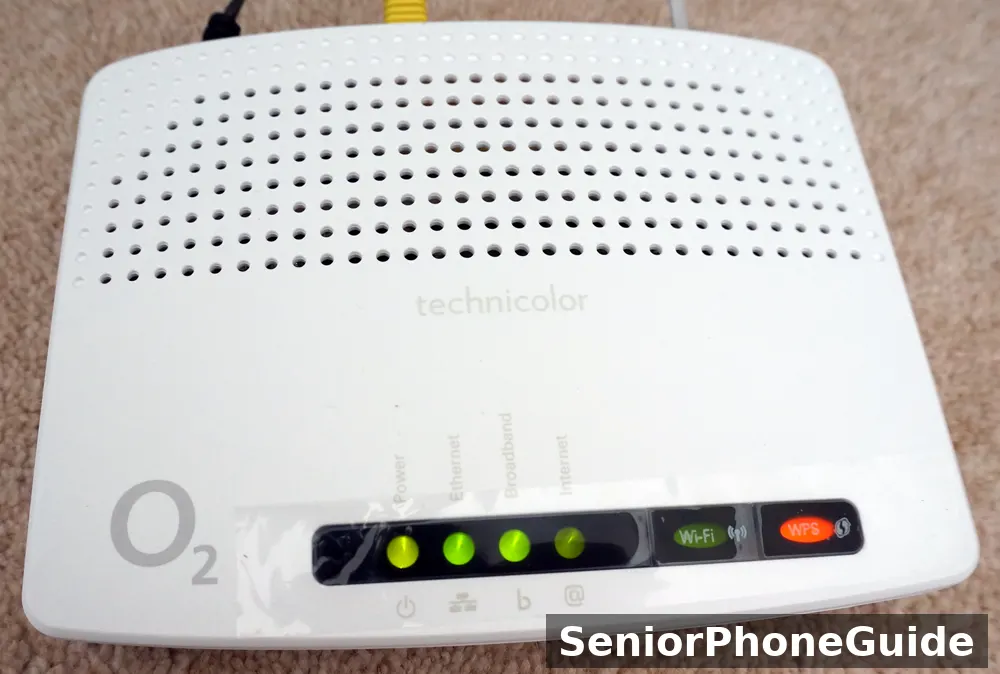
First, the router: look at the lights on your BT router. A steady broadband light means the line is connected; a flashing or red light means a fault worth checking. The router's own lights are evidence no caller can fake, and they are the fastest check of all. If the lights are steady and the internet works, the disconnection threat was a lie, whatever the caller said.
Second, My BT: open the My BT app you already have, or type the address yourself in your browser, and look for messages, faults, or bills. A real fault, a real bill, or a real planned change appears here, in writing, where you can re-read it calmly. If My BT shows nothing matching the caller's claim, the claim was false. Never open My BT through a link in a message or an instruction from a caller — type it yourself, every time.
Third, a number you already know: call BT on a number from a bill, a letter, or the BT website you opened yourself — never a number the caller gave you, and never a number from a voicemail left by the caller. Tell BT what the caller claimed, and ask whether anything matches. BT can confirm in seconds whether your account has any fault, bill, or disconnection notice, and the answer is almost always no. That one call, made by you, is the whole defence against every variant of this scam.
If You Shared or Paid
Case 1: you answered, but pressed nothing and shared nothing
Nothing was shared and nothing was paid, so nothing needs recovering. Hang up if you are still on the line. Do not call the number back. Block the number if your phone offers it in one tap, and carry on. Answering alone does not give a scammer access to your phone or your accounts; the danger starts with engagement, and you did not engage.
Case 2: you pressed 1, or spoke to the caller, but shared nothing
Hang up at once. The key press or the conversation may mark the number as live, which can bring more calls — so expect a busier few days, and lean on your call blocking rather than switching it off in frustration. Block the number. Tell a trusted person what happened, so the next call does not catch you alone. No accounts need changing, because nothing was shared.
Case 3: you shared personal details, but no money moved
Hang up, then act in this order. Call 159, or the number on the back of your card, and tell the bank what was shared, so it can watch or freeze the account. Change the password of every account whose details were shared, starting with email and banking, from a clean device — a different phone or computer the caller never touched. Switch on two-factor authentication on those accounts. Then tell a trusted person and report, as in the next section. Do this calmly and quickly: speed matters more than embarrassment, and the people you tell have heard this story before.

Case 4: you paid, or gave card or bank details that could move money
Hang up, then call 159 at once, or the number on the back of your card, and say you were scammed. Ask about stopping the payment, replacing the card, and watching the account. The faster this call happens, the more can be done: card payments can sometimes be reversed, bank transfers are time-critical, and gift cards drain fastest of all, so a gift-card issuer should be called within minutes with the card numbers and receipts. Keep every receipt, message, and call log. Then tell a trusted person and report. If the caller is still on the line demanding more, hang up anyway — no genuine company keeps you on the line while you call your bank.
Case 5: you let the caller onto your computer
Disconnect the device from the internet at once — unplug the cable or switch off the Wi-Fi — and hang up. Do not let the caller finish anything or clean up. Then have a trusted person or reputable local technician check the device, remove anything the caller installed, and run a full security scan. Change every password typed or visible during the session, starting with email and banking, from a different, clean device. Then report. This case feels the worst, and it is the one where a calm helper matters most — the device can be cleaned, the passwords can be changed, and the accounts can be watched.
One rule covers all five cases: never pay anyone who contacts you claiming they can recover money already lost to a BT scam call. Recovery scams are a second scam aimed at the same victims, and they arrive as helpful calls, official-looking messages, and promises of refunds for a fee. Money lost to a scam is recovered through the bank and the reporting routes, never through a stranger who calls asking for a further payment.
Family-Helper Checklist
Start with the person's own phone and router, not yours. Walk the first-hour checklist together, on their handset, and let them press the buttons while you guide. Show them what a blocked or silenced call looks like, and show them where blocked numbers live, so a mistake is fixable rather than frightening. Agree the family code word for the one case blocking cannot solve: a caller claiming a family emergency must give the word before anything else is discussed. A real family member can be verified through a number the family already knows; a scammer cannot guess the word.
Then agree the routine, in writing, on the settings card. Who checks voicemail, and when — once a day at the same time works best. Who reviews the blocked list, and how often — once a month is enough. What happens when a caller frightens the person — the rule is to hang up first and call the helper second, never to stay on the line working it out alone. And what happens after a software update — check the spam setting stayed on, because updates occasionally reset call settings, and the card shows what on looks like.
For a parent who lives alone, add two more habits. First, a weekly call from the helper that is not about the phone at all — a normal chat, during which the helper casually asks whether any strange calls came through. Seniors often hide frightening calls out of embarrassment, and a routine chat surfaces them without an interrogation. Second, warn the neighbours: BT scam calls hit whole streets at once, because scammers work through number ranges, and a warned street is a street where the script dies on the first doorstep.
For a parent with memory loss, simplify further. Fewer choices beat stronger tools: a landline phone where only contacts ring through, with everything else to voicemail, and a helper who checks that voicemail daily. Do not add an app the person cannot tend, and do not rely on the person remembering a rule under pressure. The system must protect them on a bad day, when they forget the rule entirely — and a system that only works when remembered is not a system for memory loss.
Where to look: compare scam-protection books for seniors and amplified phones with call blocking for seniors, and check the current listing details for call-blocking features on the exact model before you buy.
Reporting Pack
Reporting is the step everyone skips, and it is the step that makes the next person's phone quieter. Report every BT scam call to Action Fraud — online at actionfraud.police.uk, or on 0300 123 2040 — keeping the number, the time, and what the caller claimed. Keep a short note of every report: date, number, what was claimed, and any reference number given. The note costs a minute and turns a vague complaint into a useful one.
Two more routes deserve a plain explanation. Citizens Advice can help if you are unsure whether something was a scam, or if money was lost and you need to understand your options — it is the general advice route, and it can point you to the right specialist help. And BT itself wants to know: report the scam call through bt.com/scams, so BT can warn other customers and work with the industry to block the numbers. Reporting to BT is not a substitute for Action Fraud, and Action Fraud is not a substitute for calling your bank — the three routes do three different jobs, and a serious case needs all three.
Two further reports help the wider picture: nuisance and scam calls can be reported to Ofcom, the UK telecoms regulator, and scam texts forwarded to 7726 (SPAM) before deletion, so carriers can block the sending numbers. Scam emails go to the National Cyber Security Centre at report@phishing.gov.uk; in Scotland, report calls to Police Scotland rather than Action Fraud; and Friends Against Scams offers free awareness training for families who want to learn the scripts together.
For the wider scam-safety picture, see our guide to stopping robocalls and our guide to Amazon account scam calls and texts.

When BT Really Contacts You
A real bill arrives by letter or inside your My BT account, with an amount you can check against your package, a date you can plan around, and a way to query it. A real fault notice appears in My BT, or by letter, or by a message you can re-read — never as a voice giving you hours. A real appointment is one you booked, with a date, a time window, and a reference, and the engineer who arrives carries identification and works on the fault you reported. A real offer — a faster package, a new service — arrives in writing, with time to consider it, and never requires an immediate payment on a call you did not expect.
BT's own protections are worth switching on: Call Protect blocks nuisance and withheld numbers free of charge — switch it on through My BT or from the phone itself — and Scam Threat Protect flags calls BT suspects are scams before you answer. Neither replaces hanging up on a call you did not expect, but both cut how many reach you at all.
Three habits make the distinction automatic. First, never act on a call you did not expect: hang up, and check through My BT or a number you already know. Second, never let urgency decide: a real company gives you time, in writing, and a scammer gives you a countdown, on the phone. Third, never pay or grant access on a first contact: a real BT process has steps you can verify at each stage, and any process that jumps straight to payment or access is not a BT process at all.
First win: the first quiet week is the proof the setup works. When a whole week passes without a single BT scam call getting through, and the only messages are genuine ones from people you know, the phone has gone back to being a tool instead of a source of dread. That is the result this guide is built for, and it is reachable in one day of setup.
Skip this guide if: the person never answers unknown numbers anyway, never shares details by phone, and already has call blocking plus a trusted-person routine working — in that case, the only steps still worth adding are the family code word and the 159 number on the settings card, and everything else here is already done.
Bottom line: hang up on any unexpected BT call, check My BT yourself, and call 159 if money was mentioned. That one habit plus the settings card beats every version of this scam, old or new.
Quick answers
Will BT really disconnect my broadband? Not by an unexpected phone call with a countdown. A real problem appears in My BT or by letter, with time to query it.
What is the single most important rule? Hang up on any unexpected BT call, and check through My BT or a number you already know.
What if I already pressed 1? Hang up now, block the number, expect a busier few days, and tell a trusted person. No accounts need changing unless details or money were shared.
What is 159? A UK-wide number that connects you safely to your bank's fraud team. Dial it if money or bank details were mentioned.
Do I need to buy anything? No. Hanging up, My BT, 159, and Action Fraud are all free. A landline blocking device is the one purchase genuinely worth it for a landline household.
Follow along: SeniorPhoneGuide on Pinterest shares one plain-language senior-phone tip at a time — follow SeniorPhoneGuide on Pinterest.
Frequently asked questions
- What is going on with BT Internet?
- Usually this means someone is searching about a BT service problem or an outage — and scammers exploit exactly that confusion by calling during or after real service problems. If a call claims your internet will be cut off, treat it as a scam until you check through My BT yourself, or through a BT number you already know. A real BT problem appears in your account or by letter, never as an urgent voice giving you hours.
- Can a scammer access your phone if you answer a call?
- No. Answering a call alone does not give a scammer access to your phone, your computer, or your accounts. The danger starts only when you engage: pressing a key, following instructions, downloading something, sharing a code or details, or letting someone onto your device. That is why the whole defence in this guide is built around not engaging — hang up, let unknown numbers go to voicemail, and check anything suspicious through a channel you control. An unanswered scam call is an annoyance, not a breach.
- Can I cancel my landline and still have internet with BT?
- In many cases yes — broadband and landline phone service can be separate — but it depends on your line and your package, so check with BT on a number you already know before changing anything. Never make the change because a caller told you to, and never let a caller "help" you change it on the call. If you are considering it, the safe route is a call you make yourself, at a time you choose, to a number from a bill or from the BT website you opened yourself.
- Why am I getting calls from a 0141 number?
- 0141 is the dialling code for Glasgow — but scammers fake caller ID, so a 0141 number on your screen does not mean the caller is in Glasgow, or anywhere near it. Scammers use local-looking numbers precisely because people answer local calls. Judge the call by what it asks, never by the number it shows: if it claims to be BT and threatens disconnection, hang up and check through My BT yourself, whatever area code it displayed.
- What does the BT disconnection scam call sound like?
- Usually an automated voice, or a live person calling themselves an engineer, saying your broadband will be disconnected within 24 to 48 hours because of a fault, an unpaid bill, or illegal activity on your connection — followed by an instruction to press a number, stay on the line, or let them fix it now. The details vary, but the structure never does: a trusted name, a problem you did not know about, a deadline measured in hours, and an instruction to act immediately. A real BT problem never arrives that way.
- What happens if I press 1?
- Pressing 1 tells the scammer's system that a real, responsive person is at this number, which can bring more calls, and it connects you to a live scammer trained to sound helpful and official, who will then run the rest of the script: the fake diagnosis, the request for access, the request for payment. If you already pressed 1, hang up now, before the conversation goes further, block the number, and tell a trusted person. No accounts need changing unless details or money were shared.
- What is the fake BT speed-test scam?
- A caller claiming to be from BT or Openreach says your broadband speeds are slow or your line has a fault, and offers to run a speed test or line check with you on the call. The caller then points to something normal on your screen and calls it evidence of a fault or a hacker, and the "fix" is always the same: install a program so the "engineer" can look, or pay for a faster service or security upgrade. BT does not call customers out of the blue to run speed tests. If you are worried about speeds, test them yourself through My BT or a speed-test site you choose.
- What should I do if I gave a caller remote access to my computer?
- Disconnect the computer from the internet at once — unplug the cable or switch off the Wi-Fi — and hang up. Do not let the caller finish anything or clean up. Then have a trusted person or reputable local technician check the computer, remove anything the caller installed, and run a full security scan. Change every password typed or visible during the session, starting with email and banking, from a different, clean device. Then report to Action Fraud, and call 159 or your bank if any financial details were visible.
- What is 159 and when should I call it?
- 159 is a UK-wide number that connects you safely to your bank's fraud team: dial it, follow the prompts to your bank, and you reach the real bank, not the scammer. Call it at once if a scam call mentioned money or bank details, if you shared card or bank details, or if you paid anything. If your bank is not among those reached through 159, call the number on the back of your card instead. Calling 159 first, before anything else, is the fastest protection for your money.
- What will BT never ask me for?
- BT will never call out of the blue and tell you your service has been hacked, try to remotely take control of your device, say a problem has been found with your computer, ask for urgent payment and threaten disconnection, or ask for payment details to activate Caller Display, Call Protect, or free services. If a caller does even one of these, hang up — you do not need to hear the rest of the script to know it is a scam. A real BT caller will never mind you hanging up and calling back on a number you trust.
- How do I report a BT scam call?
- Report to Action Fraud — online at actionfraud.police.uk, or on 0300 123 2040 — keeping the number, the time, and what the caller claimed. Also report through bt.com/scams, so BT can warn other customers and work to block the numbers. If money or bank details were involved, call 159 or your bank first, before reporting, because stopping the money matters more than the report. Citizens Advice can help if you are unsure whether something was a scam or need to understand your options after losing money.
- How can my family help stop these calls?
- Set the phone up together, in person, and agree a routine: who checks voicemail daily, who reviews the blocked list monthly, and what happens when a caller frightens the person — hang up first, call the helper second. Agree a family code word that any caller claiming a family emergency must give before anything else is discussed. Warn the neighbours, because BT scam calls hit whole streets at once through number ranges. And keep a settings card with the phone: the family rule, the 159 number, the trusted BT number, and the helper's name.
- My mother got a BT disconnection call and pressed 1 — what do we do now?
- Hang up at once if she is still on the line, and do not call the number back. Pressing 1 alone, with nothing shared, needs no account changes — but expect a busier few days, because the number is now marked as live, so lean on call blocking rather than switching it off. Block the number, tell a trusted person what happened, and agree the family rule together: unknown number, hang up, check later. If the conversation went further and any details or money were shared, follow the shared-or-paid cases: call 159 or the bank first, change passwords from a clean device, and report to Action Fraud.
- My father let a "BT engineer" onto his computer — what do we do now?
- Disconnect the computer from the internet at once — unplug the cable or switch off the Wi-Fi — and hang up. Do not let the caller finish anything. Then have a trusted person or reputable local technician check the computer, remove anything the caller installed, and run a full security scan. Change every password typed or visible during the session, starting with email and banking, from a different, clean device. Call 159 or the bank if any financial details were visible, and report to Action Fraud. Do all of this calmly and quickly, without blame: the device can be cleaned, the passwords can be changed, and the accounts can be watched.
- I already paid a BT scammer — can I get my money back?
- It depends on how you paid, and no one can honestly promise a refund — but acting fast gives you the best chance. Call 159 or your bank at once, on the number on the back of your card, and say you were scammed: card payments can sometimes be reversed, bank transfers are time-critical, and gift cards drain fastest, so call the gift-card issuer within minutes with the card numbers and receipts. Keep every receipt, message, and call log, tell a trusted person, and report to Action Fraud. Never pay anyone who contacts you claiming they can recover the money for a fee — that is a second scam aimed at the same victim.
The bottom line: hang up on any unexpected BT call, check My BT yourself, and call 159 if money was mentioned. That one habit — hang up, check yourself, call a number you already know — defeats every script in this guide, including the ones that have not been invented yet.
Related: how to stop robocalls.