
Cell Phone Signal Boosters for Seniors in 2026: 6 Picks That Actually Work
A signal booster cannot create signal — it makes the signal outside your house stronger inside. Measure your dBm first, then buy by house size: one room, a whole house, or a near-dead zone.
As an Amazon Associate, I earn from qualifying purchases.
Short on time? See the current price on Amazon.
Last updated: November 1, 2026
Affiliate disclosure: As an Amazon Associate I earn from qualifying purchases. Our picks come from our own research into manufacturer specifications and real user reviews — prices and availability change often, so check the current price on Amazon before you buy. It costs you nothing extra, and it keeps this site free. We still print no prices on this page — they change too often to print honestly — and every feature below was checked against the manufacturer's or carrier's official information in October 2026. Read our affiliate disclosure.

The short version: measure your signal in dBm before you buy anything, then match the booster to your house size. A booster cannot create signal where there is none — if you have no bars anywhere outside, try Wi-Fi calling first. For most homes, the weBoost Home MultiRoom is the right starting point.
Our verdict: start with the free checks (Wi-Fi calling, the window test, the dBm reading), then buy by house size and by whether you can climb a ladder. One room means the Home Room; a whole house means the MultiRoom; a near-dead zone means the Cel-Fi GO G41. If nobody in the house can get on the roof, buy the installed kit instead of the DIY one.
The short answer: measure first, then buy by house size
A cell phone signal booster takes the weak signal outside your house, makes it stronger, and rebroadcasts it indoors. That is the whole job. It does not create signal, it does not fix your Wi-Fi, and it does not replace your internet. If your phone shows no bars anywhere outside your property — not at the front door, not in the yard, not at the street — a booster has nothing to amplify, and no model on this page will help you. The free fix in that case is Wi-Fi calling, which routes your calls over your home internet instead of the cell network. Turn it on in your phone's settings, and test it before you spend anything.
If you do get one or two bars outside, a booster is the right tool, and the buying decision is simpler than the listings make it look. Three things decide it: how strong your outside signal is, how big the space is, and whether someone in the house can mount an antenna on the roof or a high wall. Measure the signal first. Everything after that follows from the number. And if the phone itself is hard to hear or hard to use, fix that first with our big-button phone guide — a booster cannot fix a phone you cannot hear.
The number that matters is dBm, not bars. Bars are subjective — two phones standing side by side can show different bars on the same network. dBm is the objective measurement, and every booster decision in this guide uses it. The section below shows you how to read it in under a minute, on an iPhone or an Android phone, with no app and no purchase.
How a booster works — and what it cannot do
A home booster system has three parts, joined by coaxial cable. The outside antenna catches the signal from the nearest cell tower. The amplifier — the box in the middle — makes that signal stronger. The inside antenna rebroadcasts the strengthened signal through the rooms. Think of it as a relay team: the outside antenna is the catcher, the amplifier is the muscle, and the inside antenna is the broadcaster. If any one of the three is in the wrong place, the whole system underperforms, which is why the installation section below matters as much as the pick itself.
What a booster cannot do is just as important. It cannot create a signal where there is none. It cannot improve your home internet, your cable, or your fibre line — it only amplifies cellular signal for phones and cellular hotspots. It does not boost your Wi-Fi network, and it will not make a Wi-Fi router faster. And on 5G, it helps only the 5G that carriers run on existing 4G bands. It does not boost millimetre-wave 5G or most newer 5G bands, so if your area's 5G runs on one of those, the booster will help your calls and your 4G data, but not that particular 5G signal.
There is one more honest limit. A booster amplifies the signal it can hear. If your carrier has no tower near your house but another carrier does, the booster will amplify a faint signal from your carrier and do nothing for the strong one next door. Before you buy, check which carrier's tower is nearest — the free apps in the measuring section show you — because switching carriers sometimes beats buying a booster outright. If everyone in the house is on the same carrier and that carrier is the weak one, a single-carrier booster is worth considering; if the house has two or three different carriers, you need a multi-carrier kit.
Measure first: the dBm reading that decides everything

Do this before you look at a single product. Walk outside with your phone and find your signal strength in dBm. On an iPhone, dial *3001#12345#* and press call. That opens Field Test Mode. Depending on your iOS version, you may need to open a menu to find "Serving Cell Meas" or a similar entry — look for "rsrp", which is your dBm reading. On an Android phone, go to Settings, then About Phone, then Status or Network. The signal strength is listed there as dBm. The exact path varies slightly between manufacturers, but it is always in the About Phone area.
Walk around the outside of the house and note the number in several spots: the front, the back, the side facing the road, and up high if you can safely reach a window on the top floor. The spot with the least negative number — minus 85 is much better than minus 110 — is where the outside antenna belongs. Here is what the number means:
- -50 to -79 dBm: excellent. A booster will work exceptionally well and give you maximum indoor coverage.
- -80 to -89 dBm: good. You will see a big improvement and a large coverage area.
- -90 to -99 dBm: fair. A booster is highly recommended, and performance will be solid.
- -100 to -109 dBm: poor. You need a powerful booster to get reliable indoor coverage, and a directional antenna aimed at the tower.
- -110 to -120 dBm: very poor, near a dead zone. Most boosters will struggle. A high-gain single-carrier system might work, but success is not guaranteed — and if the number is this low everywhere on the property, Wi-Fi calling is the safer first step.
Two free apps help with the next step, finding the tower. CellMapper and OpenSignal show where your carrier's towers are, so you can point a directional antenna at the right one instead of guessing. Aiming the antenna directly at the tower can improve the signal by 10 to 15 dBm on its own — that is often the difference between a booster that works and one that disappoints.
While you are measuring, run the three free fixes. First, turn on Wi-Fi calling and make a test call from the room where calls usually drop. Second, take a call standing near a window or upstairs — height and glass beat thick walls. Third, take off a metal phone case and test again; metal cases can block signal, while plastic and silicone cases rarely matter. If Wi-Fi calling solves the problem, you may not need a booster at all, and you have saved the whole purchase. If it does not, the dBm number tells you which booster to buy.
The picks: 6 boosters that actually work

Every pick below is FCC certified, works with the major US carriers, and is sold on Amazon. Every figure comes from the maker's own spec page or the seller's listing — there are no invented scores here, and no pick was tested hands-on by us. The prices are given as bands, not printed figures, because booster prices change with sales and bundles, and a printed price goes stale within weeks. The band for each pick tells you what kind of money it takes.
1. weBoost Home MultiRoom — best for most homes
Best for: a whole house where calls drop in two or three rooms and at least a bar or two reaches the roof.
The Home MultiRoom is the workhorse of this list and the pick both of our rival guides put first. It covers up to 5,000 square feet — about three large rooms — with 65 dB of gain, which is near the top of what the FCC allows a multi-carrier home kit. It works with Verizon, AT&T, T-Mobile, and the other US carriers at the same time, and it supports 5G carried on 4G bands. The outside antenna is directional, so you aim it at the nearest tower, and weBoost's phone app walks you through setup. It is made in the USA and carries a two-year warranty.
The honest limits: it is pricey for a first booster, and aiming the antenna takes patience and usually a ladder. If your outside signal is extremely weak — minus 105 dBm or worse — it may not be powerful enough, and the Cel-Fi below is the better answer. But for a suburban or small-town house with a fair signal outside, this is the kit to buy. See the weBoost Home MultiRoom on Amazon.
2. weBoost Home Room — best for one room or an apartment
Best for: one room, a home office, or a small apartment where the rest of the house is fine.
If the problem is a single room — the bedroom where you take evening calls, the home office at the back of the house — you do not need a whole-house system. The Home Room covers up to 1,500 square feet with a desktop inside antenna that sits on any flat surface, and the outside antenna mounts easily to a deck railing. Setup is the simplest of any kit here, and it sits in the lowest price band. It is the right pick for an apartment, where a roof antenna is out of the question and the landlord will not allow drilling. See the weBoost Home Room on Amazon.
If one room is all you need but you would rather have an outside antenna that needs no aiming at all, the weBoost Home Studio Omni is the same idea with a pole antenna instead of a directional one, a desktop inside antenna, and the same two-year warranty plus a money-back period. It is the easier install of the two; the Home Room is the cheaper one.
3. HiBoost F10G-5S-BTW — best for a midsize home without drilling
Best for: a midsize home where nobody wants to drill a hole through a wall.
The HiBoost F10G-5S-BTW covers up to 4,000 square feet — two or three rooms — and its best feature for a senior household is the screen on the front of the amplifier. It shows the signal readings while you set it up, and the HiBoost app shows the same data with guided setup, so you can see the numbers improve as you move the antenna instead of guessing. A flat cable slips under a window to connect the outside antenna, which means no drilling and no hole in the wall. The warranty runs three years.
One honest caution: HiBoost does not list this exact model on its own website, so most of the specifications come from the seller's listing rather than the maker. That is not a reason to reject it — the brand is established and the kit is widely sold — but it is a reason to check the listing's FCC ID before you buy, as the safety section below explains. See the HiBoost F10G-5S-BTW on Amazon.
4. SureCall Fusion4Home — best for a small house with no aiming
Best for: a small house or apartment where you want an antenna that needs no aiming.
The Fusion4Home uses an omnidirectional outside antenna, which pulls signal from every direction and never needs to be pointed at a tower. That makes it the easiest install for someone who does not want to climb a ladder twice — once to mount the antenna and once to adjust it. The inside antenna screws straight onto the amplifier, and dials on the front let you turn individual bands down if the unit overloads. The warranty runs three years, the longest on this page.
The limits are real. The amplifier needs plenty of distance from the outside antenna, which is hard to arrange in a small home, and far towers come in weak because the omni antenna does not reach as far as a directional one. SureCall's own coverage chart shows the honest picture: up to 2,000 square feet with five bars outside, shrinking to about 500 square feet with one or two bars. Treat the big number on any box as a best case, and this kit as a small-home answer. See the SureCall Fusion4Home on Amazon.
5. Cel-Fi GO G41 — best for a large home or a near-dead zone
Best for: a large home, a rural house, or a signal so weak that the multi-carrier kits cannot do enough.
The GO G41 is the most powerful booster a household can legally buy. It boosts one carrier at a time — AT&T, Verizon, or T-Mobile, changeable in the app — and because it only boosts one carrier, the FCC allows it 100 dB of gain, against the 65 to 72 dB limit for multi-carrier kits. That is the unit that can turn a near-dead zone into a working house. Both a dome and a panel inside antenna come in the kit, so you can use whichever suits the room.
The price is the highest on this page, and there are two real trade-offs. Guests on other carriers get no boost at all, so if the family uses two carriers, only one of them improves. And setup and reconnection can be troublesome — this is not a plug-in-and-forget kit. One warning about rival guides: some still recommend the older Cel-Fi GO X. That model is discontinued. The G41 is its replacement, and it is the one to buy. See the Cel-Fi GO G41 on Amazon.
6. weBoost Drive Reach — best for the car
Best for: a senior who drives and loses signal on fringe stretches of road.
A home booster stays at home. For the car, the Drive Reach gives the strongest boost the FCC allows in a moving vehicle — 50 dB, the vehicle cap — and it works while you drive. A magnetic antenna sits on the roof, the booster tucks under a seat, and it runs off the car's power outlet. It works with all major carriers, and it carries a two-year warranty. It helps on fringe stretches of highway, on the way to a medical appointment or to visit family, where the signal fades in and out. It does not help in a true dead zone, and it is pricey for a car accessory — but for a senior who drives alone, a working phone on the road is a safety device, not a luxury. See the weBoost Drive Reach on Amazon.
Campers and RVs under about 25 feet have their own kit, the weBoost RV20, with an adjustable mast for the outside antenna and a small panel antenna on an inside wall, running on the RV's power. Longer rigs fall outside its range, and owner feedback on it is thin — buy it for a small camper, not a full-size motorhome.
Budget bands: what each band buys
Booster prices change with sales, bundles, and the season, so this guide prints bands, not prices. A printed price is wrong within weeks; a band stays useful. Here is what each band buys in this market:
- Under $200: one-room and two-room kits. The weBoost Home Room lives here, and so does the HiBoost F08G-5S-IOT, the cheapest kit from an established brand — a colour screen that shows incoming signal while you hunt for the best antenna spot, a directional antenna that reaches farther than a simple pole, and a small inside antenna that limits how far the signal spreads. Owner feedback on it is mixed, and it is a one-or-two-room answer, not a whole-house one. This band is the right place to start if you have never owned a booster and want to prove the idea in one room first.
- $200 to $400: midsize-home kits. The HiBoost F10G-5S-BTW and the SureCall Fusion4Home sit here — two or three rooms, a screen or dials to tune the system, and a three-year warranty on both. This is the band where most senior households should buy: enough power for a real house, without paying for power you will never use.
- $400 to $700: whole-house kits. The weBoost Home MultiRoom is the pick here — up to 5,000 square feet, three rooms, the app-guided setup, and the strongest multi-carrier gain the FCC allows. If the house is large and the signal outside is fair, this band is where the money goes.
- Over $700: single-carrier power and installed systems. The Cel-Fi GO G41 lives here, and so does the installed route in the next section. Buy in this band only when the dBm reading says you must — a very weak outside signal or a very large house — not because a bigger number feels safer.
If the cost is the problem rather than the choice, check whether you qualify for Lifeline first. Lifeline is the federal programme that pays up to $9.25 a month toward phone service for seniors on SSI or Medicaid, and it is explained in full in our free government phone guide. A booster is a one-time purchase; Lifeline is a monthly discount. They solve different problems, and a household that qualifies for one may still need the other.
Which antenna: Yagi or omni, and how to aim it
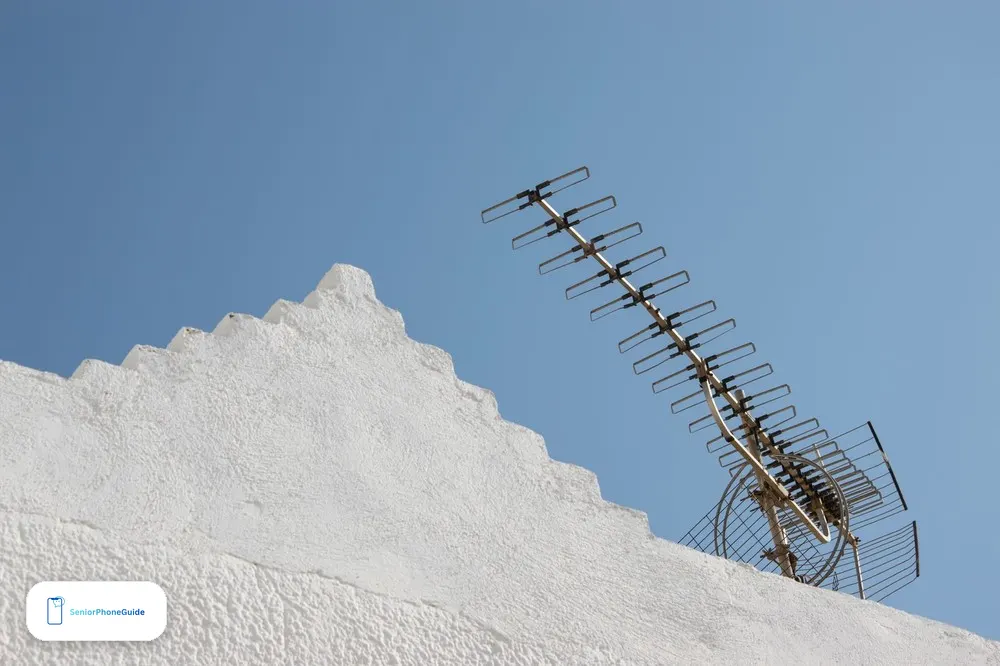
The outside antenna is the part most buyers get wrong, and it is the part that decides whether the booster works. There are two kinds. A directional antenna — the Yagi, a flat panel or a long bar with elements — pulls signal from one specific direction with high power. It is the right choice for rural areas and weak signals, minus 95 dBm or worse, because it reaches farther than any other antenna. A omnidirectional antenna — a pole — pulls signal from all directions, 360 degrees. It is the right choice for urban and suburban areas with decent signal from several towers, because it needs no aiming at all.
If you buy a directional antenna, you must aim it. Use CellMapper or OpenSignal to find your carrier's nearest tower, then point the antenna at it. Do not guess: aiming directly at the tower can improve the signal by 10 to 15 dBm, which is often the difference between a booster that works and one that disappoints. Mount it as high as you safely can — a roof or a high exterior wall — on the side of the house that faces the tower. If the house has a metal roof, keep the antenna away from the metal and remember that the metal itself blocks signal; the inside antenna's placement matters just as much, which the next section covers.
One more check before you order: confirm which carrier's tower is nearest. If your carrier's nearest tower is miles away while another carrier's tower is a mile down the road, the booster will amplify your carrier's faint signal and ignore the strong one. Switching carriers is free in the sense that it costs no hardware — and for a senior on a cheap cell phone plan, it can be cheaper than a booster. Our guide to choosing a phone for a senior covers the carrier question in full, and it is worth reading before you pay for hardware.
Installing it without a ladder — and without drilling
Every rival guide assumes someone in the house will climb onto the roof. For a senior household, that assumption is the first thing to question. There are four honest paths, in order of difficulty.
First, the no-drill path. Some kits, like the HiBoost above, include a flat cable that slips under a window to connect the outside antenna. The outside antenna mounts to a deck railing or a window frame, the cable runs under the window, and the amplifier sits on a table inside. No hole in the wall, no roof, no ladder. If you rent, ask the landlord in writing before you mount anything outside — a short written note beats an argument later — and in assisted living, ask the manager first: many buildings forbid outside antennas outright, and a desktop inside antenna with a window-mounted outside antenna is the only arrangement they allow.
Second, the separation rule. The number one cause of a booster that underperforms is oscillation — feedback. It happens when the inside antenna is too close to the outside one: the booster hears its own output and automatically turns its power down, or shuts off. Aim for at least 20 feet of vertical separation or 50 feet of horizontal separation between the two antennas; SureCall recommends at least 30 feet of horizontal separation for the Fusion4Home. More is always better, and vertical separation counts for more than horizontal — the outside antenna on the roof with the amplifier on a lower floor is the ideal layout. If a booster keeps cutting out, unplug it, move the antennas farther apart, and plug it back in.
Third, the inside path. Think about what the inside signal has to travel through. An attic full of insulation, a metal roof, and thick plaster walls all eat signal. A panel antenna on a central wall spreads coverage far better than a small antenna sitting on the amplifier in a corner room. Keep cable runs short — every foot of coax loses a little signal — and use the high-quality cables included with the kit rather than adding extensions. If you must run a long cable, invest in ultra-low-loss LMR-400 cable. And ground the system: a simple lightning surge protector, properly grounded, can save an expensive amplifier from a power surge, and it is a safety step, not an optional extra.
Fourth, the installed path. If nobody in the house can safely get on a roof, do not improvise. weBoost sells the same idea as an installed package — the weBoost Home Complete Installed — where a technician mounts the outside antenna, runs the cable, and sets up the booster. It covers larger homes than the do-it-yourself kits and costs roughly three times as much as the Home MultiRoom, but it is the right answer for a household with no one able to climb. A local installer can do the same for any brand; ask for a fixed quote in writing before the work starts, and confirm the installer registers the booster with the carrier, which the next section explains.
Safety: registration, 911, and the medical alert in your pocket

Cell phone boosters are legal in the United States. Since 2014 the FCC has authorised consumer boosters, provided they are certified by the FCC. Every reputable brand is certified. But there are three rules that no rival guide explains properly, and all three matter more for a senior living alone than for anyone else.
Register the booster. The major carriers ask owners to register their booster, and it is free and done online. If the carrier or the FCC reports interference, you must turn the booster off. That sounds alarming, but it almost never happens with a certified kit installed with proper antenna separation — interference comes from no-name kits and bad installs. Be wary of any cheap kit that claims you never need to register it: you can look up any printed FCC ID in the FCC's equipment database to see what it was issued for, and a kit with no verifiable FCC ID is a kit to return.
Know the 911 catch. The FCC notes that a booster can make 911 location less accurate. The reason is simple: the call appears to come from the booster's inside antenna rather than from the phone's true position. For a senior living alone, the fix is a habit, not a device: when you call 911, say your address first, before anything else. And keep a backup that does not depend on the booster — a landline, or a medical alert pendant that uses its own cellular connection. Read our Emergency SOS setup guide and set up SOS on the phone before the booster goes in, not after.
Remember the pendant. Many fall-detection pendants and medical alert systems use cellular to call for help, and a dead zone can silence them exactly when they are needed most. A booster helps a pendant the same way it helps a phone — it is the same cellular signal — but only if the pendant is inside the boosted area. When you place the inside antenna, put it where the pendant is worn most: the bedroom and the bathroom, not the garage. And test it: press the pendant's test button after the install, the way the pendant's own instructions describe, and confirm the call goes through. A booster that helps the phone but leaves the pendant in a dead corner has not finished the job.
What not to buy
The fastest way to waste money on a booster is to buy the wrong kind. Five traps, all of them common:
- A no-name kit with no FCC ID. If the listing cannot show a verifiable FCC ID, or claims you never need to register, return it. Uncertified boosters can interfere with the carrier's network, and the carrier can order you to switch it off.
- A vehicle kit for a house. Vehicle boosters are capped at 50 dB by FCC rules. They are built for a car, with a magnetic roof antenna and 12-volt power. In a house they are weak, and the inside antenna will not cover a room properly. Buy the home kit for the home and the car kit for the car.
- A single-carrier booster for a multi-carrier house. The Cel-Fi GO G41 is the most powerful kit on this page, but it boosts one carrier at a time. If the house has Verizon and T-Mobile phones, one of them gets nothing. Multi-carrier first, single-carrier only when everyone shares one carrier and the signal is very weak.
- A used or refurbished kit with no warranty. Boosters are systems — antenna, amplifier, cable — and a missing or damaged part is hard to spot until the install fails. The warranties on this page run two to three years. A used kit with no warranty and no return window is a gamble, not a bargain.
- Any booster when there is no signal at all. If the dBm reading is a dead zone everywhere on the property, no booster will help, at any price. Wi-Fi calling, a different carrier, or a satellite option for a truly remote home are the honest answers. Buying a bigger booster for a dead zone is the most expensive mistake in this guide.
One more trap is not a product but a listing. Some sellers advertise a booster with a coverage number that assumes a strong outside signal — "up to 15,000 square feet" — and bury the fact that the same kit covers a fraction of that with a weak signal. The SureCall chart above is the honest version of that story. Judge every kit by its coverage at YOUR dBm reading, not by the biggest number on the box.
Troubleshooting: when it still does not work
Most booster problems are installation problems, and most of them have a fix that costs nothing.
The booster keeps cutting out. That is oscillation — the inside and outside antennas are too close. Unplug the amplifier, move the antennas farther apart (more vertical separation first), and plug it back in. Check that the inside antenna is not pointing at the outside antenna through a window or a thin wall.
Still no bars inside. Check the antenna spot first: walk outside again with the dBm reading and confirm the outside antenna is mounted where the signal is strongest. Then check the aim: a directional antenna pointed at the wrong tower hears nothing. Then check the inside path: is the inside antenna behind a metal roof, an insulated attic, or three plaster walls from where you sit? Move it to a central wall and test again.
One carrier works and another does not. That is normal for a single-carrier kit, and it means the kit is doing its job for one carrier only. For a multi-carrier kit, it usually means the working carrier's tower is near and the other carrier's tower is far — the booster amplifies what it can hear. Check the tower apps for the silent carrier before assuming the kit is broken.
5G is not boosting. The kit boosts 5G carried on 4G bands, not millimetre-wave 5G or most newer 5G bands. If your phone shows 5G but the data is slow, the phone may be on a band the booster cannot amplify. The calls and the 4G data will still improve; the 5G icon is not the measure. Judge the kit by whether calls stop dropping, not by the icon.
The app readings look wrong. The HiBoost screen and app show the signal the amplifier sees, not the signal your phone sees — the two differ because the phone and the amplifier are in different places. Trust the phone's dBm reading in the room where you take calls; use the amplifier's screen to tune the antenna position outside.
How this guide was written
We read the two strongest rival guides in full — eathealthy365's dBm-first buying guide and the Ezvid Wiki's nine-kit roundup, both updated in 2026 — and we read the content-farm listicles closely enough to see why their invented scores and recycled picks cannot be trusted. We did not test these boosters hands-on, and this guide does not claim otherwise: every gain, coverage, and warranty figure comes from the maker's own spec page or the seller's listing, and where a figure comes only from the seller — as with the HiBoost F10G-5S-BTW — the guide says so. Prices are given as bands because they change constantly, and a printed price would be wrong within weeks. The senior angle in this guide — the ladder question, the renter question, the 911 habit, the pendant test — comes from the gaps the rivals left, not from any rival's text. If you buy a kit, check its FCC ID in the FCC's equipment database before the return window closes, and if you share your Wi-Fi password with the family member who helps you install it, read our guide to sharing your Wi-Fi password safely first. For the phone itself, our big-button guide, our dumb phones guide, and our flip phones guide cover the handsets that work best when the signal is thin, and our senior scam checklist covers the callers who will try to sell you a booster you do not need.
Frequently asked questions
- Will a signal booster work if I have no bars at all?
- No. A booster amplifies the signal that reaches its outside antenna. If your phone shows no bars anywhere outside the house — not at the door, not in the yard, not at the street — there is nothing to amplify. Try Wi-Fi calling first, and if that does not work, consider switching carriers or, for a truly remote home, a satellite option.
- Are cell phone signal boosters legal in the US?
- Yes. Since 2014 the FCC has authorised consumer boosters, provided they are FCC certified. Every reputable brand is certified. Your carrier will ask you to register the booster, which is free and done online.
- Do I have to register my booster with my carrier?
- Yes, the major carriers ask owners to register, and it is free and done online. If the carrier or the FCC reports interference, you must turn the booster off. Certified kits installed with proper antenna separation almost never cause interference.
- Will a booster help my 5G phone?
- It helps 5G carried on existing 4G bands, which is most of the 5G most people actually use. It does not boost millimetre-wave 5G or most newer 5G bands. Your calls and 4G data will still improve even where the 5G icon does not.
- Will a booster fix my Wi-Fi?
- No. A booster only amplifies cellular signal for phones and cellular hotspots. It has no effect on your Wi-Fi network or your home internet. If your Wi-Fi is the problem, the booster is the wrong purchase.
- How do I measure my signal in dBm on an iPhone?
- Dial *3001#12345#* and press call to open Field Test Mode, then look for "rsrp" under Serving Cell Meas. That number is your dBm reading. Walk around outside and note the least negative number — that is where the outside antenna belongs.
- How do I measure my signal on Android?
- Go to Settings, then About Phone, then Status or Network. The signal strength is listed there as dBm. The exact path varies slightly between manufacturers, but it is always in the About Phone area.
- What is the difference between a Yagi and an omni antenna?
- A Yagi (directional) antenna pulls signal from one direction with high power and must be aimed at the nearest tower — it is the right choice for rural areas and weak signals. An omni (pole) antenna pulls signal from all directions and needs no aiming — it is the right choice for urban and suburban areas with decent signal from several towers.
- How far apart must the two antennas be?
- Aim for at least 20 feet of vertical separation or 50 feet of horizontal separation. SureCall recommends at least 30 feet of horizontal separation for the Fusion4Home. More is always better, and vertical separation counts for more. Too close means oscillation, and the amplifier turns its own power down.
- Can I install a booster if I rent or live in an apartment?
- Yes, with the no-drill path: a window-mounted outside antenna, a flat cable under the window, and a desktop inside antenna. Ask the landlord in writing first, and in assisted living ask the manager — many buildings forbid outside antennas outright. The weBoost Home Room is the simplest pick for one room.
- Will a booster help my medical alert pendant?
- Yes, if the pendant uses cellular — and most fall-detection pendants do. The booster amplifies the same signal the pendant uses, but only inside the boosted area. Place the inside antenna where the pendant is worn most, the bedroom and bathroom, and press the pendant's test button after the install to confirm the call goes through.
- Does a booster make 911 less accurate?
- It can. The FCC notes that a booster can make 911 location less accurate, because the call appears to come from the booster's inside antenna. The fix is a habit: when you call 911, say your address first, before anything else, and keep a landline or medical alert as a backup.
- Which booster is best for one room?
- The weBoost Home Room, which covers up to 1,500 square feet with a desktop inside antenna and the simplest setup of any kit here. The weBoost Home Studio Omni is the same idea with a pole antenna that needs no aiming.
- Which booster is best for a large house with very weak signal?
- The Cel-Fi GO G41. It boosts one carrier at a time with 100 dB of gain — the most the FCC allows any household kit — and it is the unit that can turn a near-dead zone into a working house. It only helps the carrier you pick, so it fits a house where everyone shares one carrier.
- Should I buy a booster for my car instead?
- Only for the car. The weBoost Drive Reach is the car pick, with the FCC's 50 dB vehicle cap, a magnetic roof antenna, and 12-volt power. A vehicle kit in a house is weak by design, and a home kit in a car is not built for it. Buy the home kit for the home and the car kit for the car.
Verdict: measure the dBm first, buy by house size, and keep the antennas far apart. Next step: read the dBm number outside your house, then match the pick to your house in the guide above.